
Introduction
"I want to use LLMs, but managing API keys is such a hassle…" "I don't want to send user input to the cloud…"
WebLLM solves both of these problems at once.
WebLLM is a high-performance inference engine that runs LLMs directly in the browser — completely serverless and backend-free. Unlike cloud-based AI services like ChatGPT or Claude, all inference processing is completed entirely on the user's device.
This article provides a thorough explanation of WebLLM's architecture, features, and implementation methods.
What is WebLLM?
WebLLM (@mlc-ai/web-llm) is an open-source JavaScript library developed by the MLC-AI project. It was primarily built by researchers from Carnegie Mellon University, Shanghai Jiao Tong University, and NVIDIA, and was published in late 2024 as the paper "WebLLM: A High-Performance In-Browser LLM Inference Engine".
In a nutshell:
A framework that turns the browser into a runtime environment for LLMs.
Key Features
| Feature | Description |
|---|---|
| 🌐 Fully In-Browser | No server required. No installation needed |
| 🔒 Privacy Protection | Data never leaves the device |
| ⚡ WebGPU Acceleration | Achieves 70–88% of native performance |
| 🔄 OpenAI-Compatible API | Existing code can be reused with minimal changes |
| 📦 Broad Model Support | Llama, Phi, Gemma, Mistral, and more |
How It Works
The reason WebLLM delivers high performance is that it fully leverages the latest browser technologies.
1. WebGPU — GPU Acceleration
WebGPU is a new Web API for low-level GPU access from the browser. Unlike the older WebGL, it is designed specifically for general-purpose GPU computing (GPGPU), enabling high-speed matrix operations required by LLMs.
Internally, WebLLM uses Apache TVM and MLC-LLM to optimize model computation graphs for WebGPU. State-of-the-art inference optimization techniques such as PagedAttention and FlashAttention are also incorporated.
What's particularly significant is the benefit of device abstraction. Traditional native implementations required separate codebases for each vendor — CUDA (NVIDIA), Metal (Apple), and so on — but with WebGPU, a single implementation can target multiple GPUs.
graph LR
    A[Traditional Approach] --> B[CUDA Implementation]
    A --> C[Metal Implementation]
    A --> D[OpenCL Implementation]
    A --> E[...]

    F[WebLLM Approach] --> G[Single WebGPU for All GPUs ✨]
2. WebAssembly (Wasm) — CPU Fallback
WebAssembly plays an important role when GPU is unavailable or for auxiliary CPU computations. Since it can execute advanced computational code written in C/C++ at near-native speed in the browser, it efficiently handles certain model processing on the CPU side.
3. Web Workers — UI Thread Isolation
LLM inference is extremely resource-intensive. Running it on the main thread would freeze the UI. WebLLM runs inference processing on a Web Worker, maintaining user interface responsiveness.
graph LR
    A[Main Thread] <-->|Message Passing| B[Web Worker]
    A --> C[UI Updates]
    B --> D[LLM Inference]
4. Cache Storage — Fast Startup After First Load
LLM models are typically hundreds of megabytes to several gigabytes in size. WebLLM saves downloaded models in the browser's Cache Storage, so subsequent launches load instantly from the cache.
Architecture Overview
WebLLM's architecture consists of three main components.
graph TB
    A[Web Application<br/>OpenAI-like JavaScript API]
    B[MLCEngine Web Worker<br/>Offloads heavy inference from UI thread]
    C[WebGPU / WebAssembly<br/>GPU acceleration / CPU auxiliary computation]

    A --> B
    B --> C
Performance
According to the evaluation results from the paper "WebLLM: A High-Performance In-Browser LLM Inference Engine" (arXiv:2412.15803):
When comparing WebLLM (WebGPU + JavaScript/Wasm) with MLC-LLM (Metal + Python/C++) on an Apple MacBook Pro M3 Max, WebLLM retained up to 80% of the native decode speed.
Despite running in the browser, achieving up to 80% of native performance demonstrates that it has reached a practical level of usability.
Supported Models
WebLLM supports a wide range of models (selected examples):
- Llama 3.1 / 3.2 series
- Phi 3.5 / 4 series
- Gemma 2 series
- Mistral series
- Qwen 2.5 series
Multiple quantization formats (such as q4f16_1 and q4f32_1) are available, allowing you to choose based on your device's memory capacity.
Implementation
I built a chat application using WebLLM. Here is a screenshot of it in action:
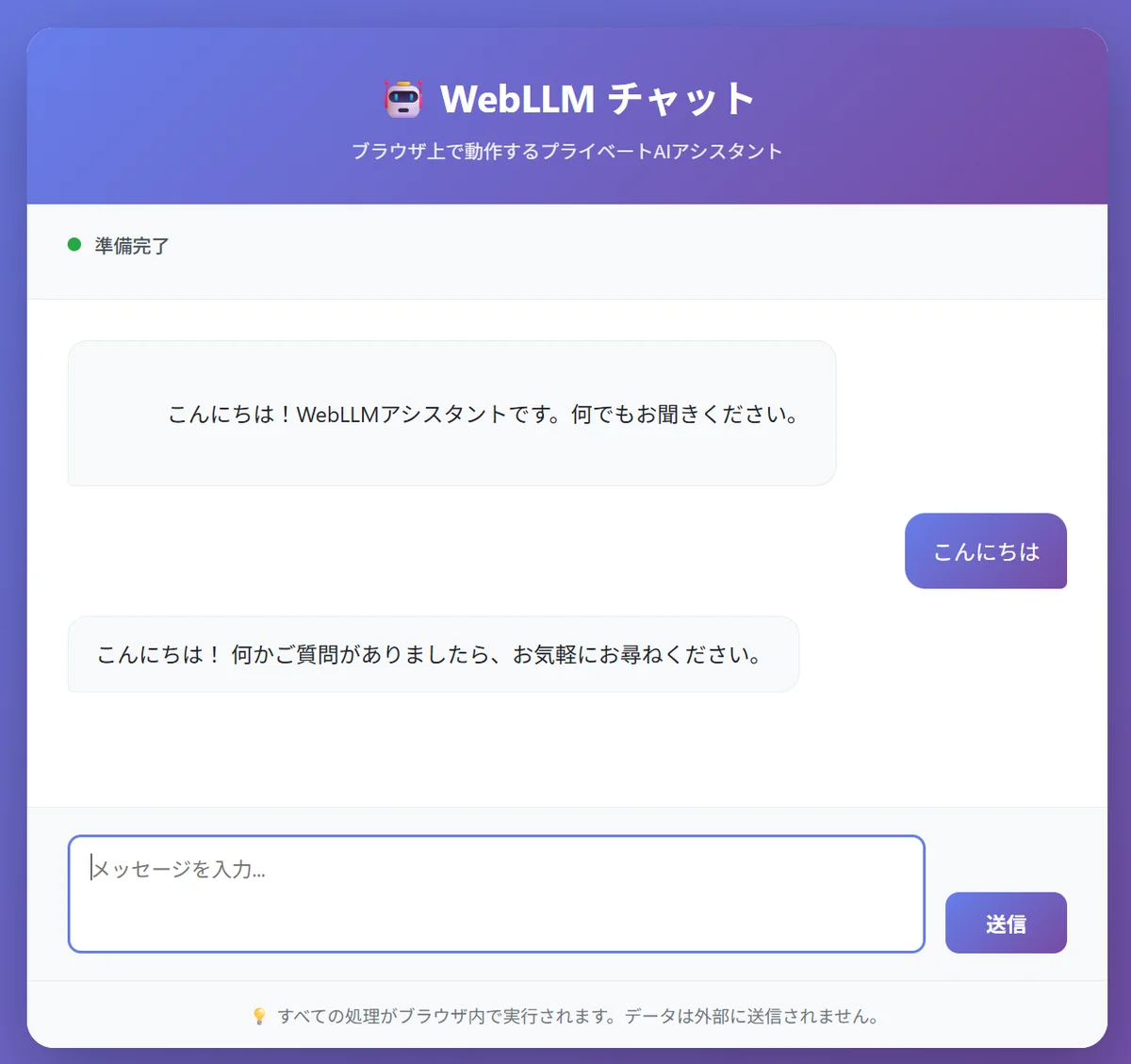
A private AI assistant that runs entirely in the browser. All processing is executed locally.
Let's walk through how to implement an application like this.
Installation
npm install @mlc-ai/web-llm
Basic Chat Implementation
import * as webllm from "@mlc-ai/web-llm";

async function main() {
  // Select a model (quantized)
  const selectedModel = "Llama-3.2-3B-Instruct-q4f16_1-MLC";

  // Initialize the engine (download progress via callback)
  const engine = await webllm.CreateMLCEngine(selectedModel, {
    initProgressCallback: (progress) => {
      console.log(`Loading: ${Math.round(progress.progress * 100)}%`);
    },
  });

  // Chat using the OpenAI-compatible API
  const reply = await engine.chat.completions.create({
    messages: [
      { role: "system", content: "You are a helpful assistant." },
      { role: "user", content: "Tell me about WebLLM." },
    ],
  });

  console.log(reply.choices[0].message.content);
}

main();
Web Worker Implementation (Recommended)
To prevent UI freezes, using Web Workers is recommended in production.
import * as webllm from "@mlc-ai/web-llm";

const handler = new webllm.WebWorkerMLCEngineHandler();
self.onmessage = (msg) => {
  handler.onmessage(msg);
};
import * as webllm from "@mlc-ai/web-llm";

const selectedModel = "Llama-3.2-3B-Instruct-q4f16_1-MLC";

// Create a Web Worker engine
const engine = new webllm.WebWorkerMLCEngine(
  new Worker(new URL("./worker.js", import.meta.url), { type: "module" })
);

// Set up the progress callback
engine.setInitProgressCallback((progress) => {
  console.log(`Loading: ${Math.round(progress.progress * 100)}%`);
});

// Load the model
await engine.reload(selectedModel);

// Then just call engine.chat.completions.create() as usual
Streaming Support
const stream = await engine.chat.completions.create({
  messages: [{ role: "user", content: "Tell me about Mount Fuji" }],
  stream: true,
});

for await (const chunk of stream) {
  const delta = chunk.choices[0]?.delta?.content ?? "";
  process.stdout.write(delta); // Real-time output
}
Caveats and Limitations
While WebLLM is a highly compelling technology, it's important to understand its current limitations.
WebGPU Browser Support (as of February 2026): The situation improved significantly by late 2025, and now all four major browsers — Chrome, Edge, Firefox, and Safari — have WebGPU enabled by default. However, support varies by platform.
| Browser | Desktop | Mobile |
|---|---|---|
| Chrome / Edge | ✅ Fully supported in stable (v113+) | ✅ Supported Android 12+ devices |
| Firefox | ✅ Windows (v141+), macOS Apple Silicon (v145+) | ⚠️ Android support expected in 2026 |
| Safari | ✅ macOS / iOS / iPadOS 26+ | ✅ iOS 26+ |
Since support also depends on GPU hardware and driver status, feature detection via navigator.gpu and a WebAssembly fallback implementation are still recommended.
Hardware Acceleration Settings
Even on GPU-equipped machines, browser settings may restrict rendering to software mode. If WebGPU shows "Software only" at chrome://gpu:
- Enable hardware acceleration: Turn on "Use hardware acceleration when available" under
chrome://settings/system - Disable GPU blocklist: Enable "Override software rendering list" in
chrome://flags - Fully restart the browser: Close all windows before relaunching
After configuration, verify that WebGPU status shows "Hardware accelerated" at chrome://gpu.
Heavy Initial Download
Models must be downloaded on first launch. Even the quantized version of Llama-3.2-3B is approximately 2–3 GB, making progress indicator implementation essential for a good user experience.
Models Are Not Shared Across Origins
Cached models are only shared within the same origin. Using the same model on a different web app requires a separate download.
Sanitizing LLM Output
Inserting generated text directly into the DOM poses XSS risks. Always sanitize output using libraries such as DOMPurify.
// ❌ Dangerous
element.innerHTML = llmOutput;

// ✅ Safe
element.innerHTML = DOMPurify.sanitize(llmOutput);
Use Cases
Here are scenarios where WebLLM is particularly effective.
Privacy-Focused Applications
In fields handling sensitive information — such as healthcare, legal, and finance — it is crucial that data is not sent to the cloud. WebLLM completes all processing on-device.
Offline-Capable Applications
Once the model is downloaded, AI features can be provided without an internet connection. Combined with PWA, you can build AI assistants that work offline.
Cost Reduction
Since API call fees are eliminated, significant cost savings can be expected for high-usage applications.
Hybrid Inference
A hybrid architecture — using in-browser WebLLM for lightweight tasks and cloud APIs for heavier ones — is also an effective approach.
Future Outlook
The WebGPU specification is still evolving, and the addition of new features such as subgroups is expected to bring further performance improvements. Enhanced support for Apple Silicon's Metal backend and mobile devices is also anticipated.
As browsers mature as edge AI execution environments, WebLLM is poised to become a standard choice for developing privacy-first AI applications.
Summary
| Item | Details |
|---|---|
| Overview | High-performance LLM inference engine running in the browser |
| Technology Stack | WebGPU + WebAssembly + Web Workers |
| Performance | Up to 80% of native performance |
| Key Benefits | Privacy protection, offline support, serverless |
| Installation | npm install @mlc-ai/web-llm |
| API Compatibility | OpenAI-compatible |
WebLLM is a technology that is reshaping the assumption that "AI runs in the cloud." Try the official demo at WebLLM Chat to experience in-browser LLM for yourself.